Subscribe:

Tuesday, December 20, 2011

WinGate 7.0.4 Build 3352


WinGate Proxy Server is a sophisticated integrated Internet gateway and communications server designed to meet the control, security and communications needs of today’s businesses. In addition to a comprehensive range of features, WinGate Proxy Server’s license options provide you the flexibility to match your needs to your budget, whether you need to manage an enterprise, small business, or home network. WinGate will share most types of Internet connections effortlessly, allowing multiple users to simultaneously surf the web, retrieve their email, or chat with online messaging, as if they were directly connected to the Internet. Whether it is a simple dialup modem or hi tech broadband solution, WinGate can help to make the most out of the connection. WinGate will handle requests from a wide variety of Web applications and Internet protocols, such as Web browsers, Messaging software, FTP and SSL. WinGate also supports DirectPlay Internet games and Real Time Streaming Audio/Video.
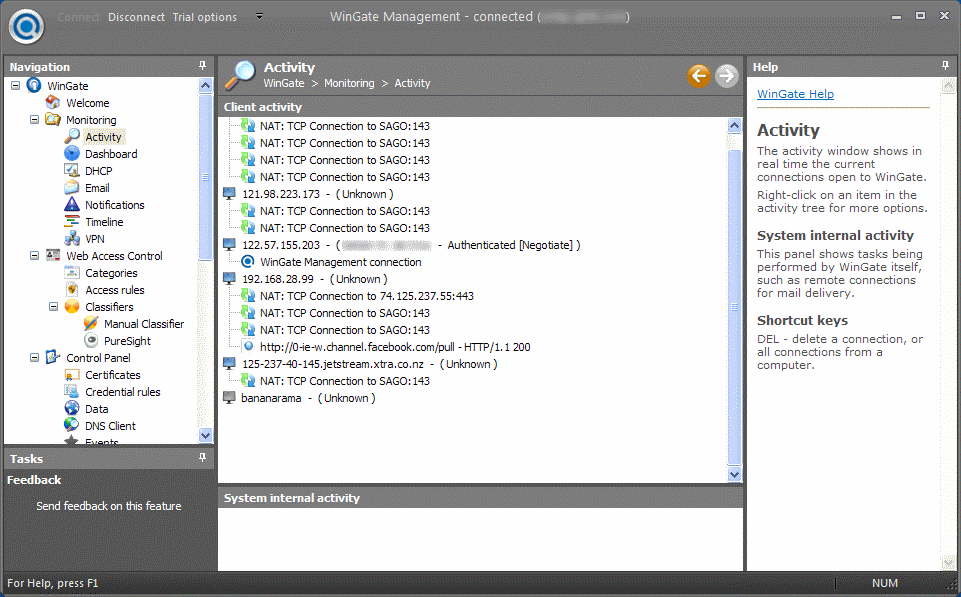
With WinGate’s user database and policies, parents and administrators alike can limit and control users access to the web. Logging, auditing, and a real time activity and history viewer – detailed records of user activities can be easily examined. This makes WinGate an ideal choice for Internet cafes and network administrators who work in environments where Internet access needs to be monitored closely.
WinGate comes complete with a built in firewall to ensure that each Internet connection is kept safe from attacks by hackers and intruders from the Internet. Your network safety can be further enhanced with optional plug-in components, available seperately, which will scan incoming data for viruses, or filter out inappropriate content. This gives peace of mind to both parents and network administrators, so that you can be sure that your family or co-workers are using the Internet appropriately.
Key Functions. WinGate allows you to:
• Provide secure and managed Internet access for your entire network via a single or multiple shared internet connections
• Enforce advanced and flexible access-control and acceptable use policies
• Monitor usage in real time, and maintain per-user and per-service audit logs.
• Stop viruses, spam and inappropriate content from entering your network
• Provide comprehensive internet and intranet email services.
• Protect your servers from internal or external threats.
• Improve network performance and responsiveness with web and DNS caching
• Ease administration burdens on your internal networks.
Key Benefits. Using WinGate to actively manage the use of your Internet and network resources can provide many benefits, including:
• Improved Employee productivity
• Minimised time and resources required to maintain network integrity
• Reduced Employer liabilities
• Improved efficiency, responsiveness and reliability of network access
Changes in Version 7.0.4 (Build 3352), Released 20 December 2011:
1. Fix: Stability problem in timeline.
2. Fix: Problem in UNC path handling in cache and email volumes.
3. Fix: Problem using SQL Native client for timeline and cache when regionalisation turned on.
4. Fix: Problem using MS SQL Driver for timeline.
5. Change: Better support for HTTP Cache function when database unavailable.
Homepage – http://www.wingate.com
Size: 25.6 MB
Read More.. Résuméabuiyad

VSO Downloader 2.0.2.3

VSO Downloader is a freeware multimedia downloader to grab streaming videos and audio from thousands of websites like Youtube, Metacafe, Vimeo, Dailymotion etc. The program sits in the background and can be set to automatically download media as you surf. VSO Downloader does not depend on any browser, it automatically detects when you are watching an online video and downloads it to your hard drive. It is a simple tool that is easy to use, it automatically detects the current video and downloads it to your hard drive. The application is entirely customizable, for example, you can automatically download all the detected videos, launch several downloads simultaneously, etc. Additionally, thousands of more media sources will be covered through support for HTTP and HTTPS protocols. Files can be renamed as they are being downloaded from remote servers, and the engine ensures the highest possible speed is achieved. If a download stops, it can be resumed later. It supports VPNs and proxy servers too. VSO Downloader has got a simple interface. Simple run the program and it will automatically keep track of any videos that you watch online. There is no need to manually add any URLs, it will automatically download the videos that you are watching to your hard disk. The program comes with an Ad Blocker and ensures that ads are not downloaded. Supports download resume and it is also compatible with HTTP, HTTPS protocols. You can configure the program to limit the number of files it downloads at a time or the number of threads to open per download. You can also filter the downloads by a minimum file size. The program will download the videos in its original format as it does not come with any converter.
Key Features:
Totally Free
• 100% Clean and free. No adware and spyware, or toolbars
Compatible with thousands of sites
• VSO Downloader is compatible with thousands of video and audio streaming sites
Streaming detection
• detects and downloads media (audio + video) files with any browser
• no need to copy and paste urls – media is detected automatically
• rename files as you are downloading
Ad Blocker
• detects ads and does not download them
User friendly file names
• smart automated file renamer is integrated
• manual file renaming during download is also possible (F2)
Extra Light
• Uses the least amount of system resources possible at all times
• Uses less than 5MB of memory
• Only uses 2% of CPU when downloading. It does not affect you as you are using your computer at the same time.
High Speed-Download
• Download accelerator engine
• Robust Multithread algorithm to download the files in mulitple parts creating 1 complete quality file
Multi-protocol support
• Support HTTP, HTTPS protocols
VPN & Proxy
• It supports all main VPNs and proxy servers. Compatible with SOCKS5 protocols and HTTP
Resume downloads
• A resume function starts the download from where it left off. When the downloading process is interrupted, you do not need to start from the beginning again.
Compatible with any web browser
• VSO Downloader works independantly from web browsers, so therefore it works with all of them, Internet Explorer, Firefox, Chrome, Opera, and more.
Streaming video/audio sites supported
Changes in VSO Downloader – 2.0.2.2, Released December 16th 2011:
New feature: Audio converter integrated
- Netherlands updated
- Brazil updated
- Slovenia updated
- Czech updated
- Various minor bugs fixed
Homepage – http://www.vso-software.fr
Size: 10.8 MB

Read More.. Résuméabuiyad

Internet Download Manager 6.08 Beta 2


Internet Download Manager (IDM) has a smart download logic accelerator that features intelligent dynamic file segmentation and safe multipart downloading technology to accelerate your downloads. IDM increases download speeds by up to 5 times, resumes and schedules downloads. Comprehensive error recovery and resume capability will restart broken or interrupted downloads due to lost connections, network problems, computer shutdowns, or unexpected power outages. Simple graphic user interface makes IDM user friendly and easy to use. IDM has a smart download logic accelerator that features intelligent dynamic file segmentation and safe multipart downloading technology to accelerate your downloads. Unlike other download managers and accelerators, IDM segments downloaded files dynamically during download process and reuses available connections without additional connect and login stages to achieve best acceleration performance.
Main Features:
• Internet Download Manager supports all popular browsers including IE, AOL, MSN, Opera, Firefox, Avant Browser, and it can be integrated into any Internet application to take over downloads using unique “Advanced Browser Integration” feature.
• Dynamic Segmentation and Performance.
• Easy downloading with one click. When you click on a download link in a browser, IDM will take over the download and accelerate it. IDM supports HTTP, FTP, HTTPS and MMS protocols.
• Download Speed Acceleration. IDM can accelerate downloads by up to 5 times due to its intelligent dynamic file segmentation technology.
• Download Resume. IDM will resume unfinished download from the place where they left off.
• YouTube grabber. IDM can grab FLV videos from popular sites like YouTube, MySpaceTV, and Google Video.
• Drag and Drop. You may simply drag and drop links to IDM, and drag and drop downloaded files out of Internet Download Manager.
• Automatic Antivirus checking. Antivirus checking makes your downloads free from viruses and trojans.
• Advanced Browser Integration. When enabled, the feature can be used to catch any download from any application.
• Built-in Scheduler. IDM can connect to the Internet at a set time, download the files you want, disconnect, or shut down your computer when it’s done.
• IDM includes web site spider and grabber. IDM downloads all required files that are specified with filters from web sites, for example all pictures from a web site, or subsets of web sites, or complete web sites for offline browsing. It’s possible to schedule multiple grabber projects to run them once at a specified time, stop them at a specified time, or run periodically to synchronize changes.
• IDM supports many types of proxy servers. For example, IDM works with Microsoft ISA, and FTP proxy servers.
• IDM supports main authentication protocols: Basic, Negotiate, NTLM, and Keberos. Thus IDM can access many Internet and proxy servers using login name and password.
• Download All feature. IDM can add all downloads linked to the current page. It’s easy to download multiple files with this feature.
• Download Categories. IDM can be used to organize downloads automatically using defined download categories.
• Download limits. Progressive downloading with quotas feature. The feature is useful for connections that use some kind of fair access policy (or FAP) like Direcway, Direct PC, Hughes, etc.
• IDM is multilingual.
What’s new in version 6.08 Beta Build 2 (Released: Dec 19, 2011):
* Added socks support
* Fixed bugs
Homepage – http://www.internetdownloadmanager.com
Size: 4.38 MB
Read More.. Résuméabuiyad

Mozilla Firefox 3.6.25


The award-winning Firefox® Web browser has security, speed and new features that will change the way you use the Web. Don’t settle for anything less. Mozilla Firefox project (formerly Firebird, which was formerly Phoenix) is a redesign of Mozilla’s browser component, written using the XUL user interface language and designed to be cross-platform. It is small, fast and easy to use, and offers many advantages over other web browsers, such as the tabbed browsing and the ability to block pop-up windows. Firefox has the most ways to customize your online experience specifically for the way you use the web. There are more than 6,000 Add-ons (little extras that augment Firefox to meet your unique needs) just waiting out there to help you do more, have more fun and be more creative online. Firefox keeps your personal info and your online interests away from the bad guys. Simply put, your security is our top priority.
Firefox 3.6 (code-named Namoroka) is based upon Gecko 1.9.2. Please collect information about changes that will impact developers here, and our happy, helpful documentation gnomes will make sure that articles are written to explain your hard coding work.
Namoroka will employ a highly iterative, milestone based development process which will rely on feedback from developers, testers and users to ensure that we are properly investing time and resources. An initial exploration phase will be used to investigate development cost and benefit, as well as to create user interaction prototypes. This will be followed by an alpha development phase for early user testing and feedback, and then a beta phase for broader compatibility testing.
Namoroka will focus on the following areas:
Performance
Observable improvements in user-perceptible performance metrics such as startup, time to open a new tab, and responsiveness when interacting with the user interface. Common user tasks should feel faster and more responsive.

Personalization & Customization

Simplify the development, discovery, installation and management of browser customization and functional extension. Where possible, provide a custom fit user experience based on a user’s interaction history. Act in the user’s interests, leveraging existing knowledge about their identity and browsing habits.
Task Based Navigation
Allow users to organize their tabs, history, downloaded files, and other resources according to the task they were attempting to accomplish. Provide support for executing common web-based tasks, mash-up style, without having to visit a website.
Web Application Support
Blur the distinction between web and desktop applications, providing web developers with the tools required to create rich application experiences for a user who is connected or disconnected from the Internet. Act as the intermediary between web applications and the user’s OS desktop.
System Integration
Integrate with the look and feel of the host operating system, including data-level interactions with existing system services such as dictionaries.
Firefox 3.6  is built on Mozilla’s Gecko 1.9.2 web rendering platform, which has been under development since early 2009 and contains many improvements for web developers, add-on developers, and users. This version is also faster and more responsive than previous versions and has been optimized to run on small device operating systems such as Maemo.
Notable Firefox 3.6 features include:
* Available in more than 70 languages – get your local version.
* Support for a new type of theme called Personas, which allow users to change Firefox’s appearance with a single click.
* Protection from out-of-date plugins to keep users safer as they browse.
* Open, native video can now be displayed full screen and supports poster frames.
* Improved javascript performance, overall browser responsiveness, and startup time.
* The ability for web developers to indicate that scripts should run asynchronously to speed up page load times.
* Continued support for downloadable web fonts using the new WOFF font format.
* Support for new CSS attributes such as gradients, background sizing, and pointer events.
* Support for new DOM and HTML5 specifications including the Drag & Drop API and the File API, which allow for more interactive web pages.
* Changes to how third-party software can integrate with Firefox in order to prevent crashes.
Release Notes
Homepage – http://www.mozilla.com/en-US/firefox/
Size: 7.52 MB
Read More.. Résuméabuiyad

KMPlayer 3.1.0.0 R2


KMPlayer (KMP+) is a korean movie and audio player that supports a wide range of codecs and file formats. It has full VCD/DVD playback functionality. KMPlayer is a versatile media player which utilizes all kinds of video information and subtitles to bring the best video experience through software/hardware options and recognition of various display devices. The player provides a strong hybrid structure efficient for interconnecting various directshow filters, winamp input&dsp plugin, and internal filters. The most outstanding feature is that the player has the full control of filter connections to prevent a media playback from being messed. KMPlayer handles a wide range of subtitles and allows you to capture audio, video, and screenshots in many ways. The player provides both internal and external filters with a fully controlled environment in terms of connections to other splitters, decoders, audio/video transform filters and renderers without grappling with the DirectShow merit system.Internal filters are not registered to user’s system to keep it from being messed up with system filters.
The KMPlayer includes almost all the essential decoders required for media playback. Furthermore, to get beyond the limitation of internal decoders, the external ones such as commercial h.264 decoders or cyberlink/intervideo audio decoders can be specified, so that KMP works optimally by the users’ own customization. Even though the KMP is based upon directshow structure, it supports Winamp, Realmedia and Quicktime by the internal logic. Thus, it is possible to specify where to try to connect firstly the media in preferences.
The player can set multifarious audio and video effects, slow down or increase playback speed with regular tone, select parts of a video as favorites, do an exceptionally powerful A-B repeat, remap the keys of remote interface for HTPC including overlay screen controls, change a skin dynamically depending on a media type playing, and many more. It is completely customizable thanks to a wide selection of skins and color schemes, and the configuration options are extremely extensive.
KMPlayer developed by a South Korean engineer and is well known for stable engine and various features and used by millions of users every day. In order to develop the KMPlayer to the next level to accommodate growing needs from all over the world, Pandora TV, the largest video streaming company in Korea has acquired the technology including the source code and core engine for the KMPlayer from the original developer, Kang Yong-Huee on August, 2007.
Features:
KMP has required codecs built-in.
• Enjoy medias without installing codecs separately.
• KMP supports both built-in and 3rd party codecs.
• KMP’s built-in codec is faster and reliable because it process internally.
• The current built-in codec supports all ffdshow codecs and also codecs that ffdshow doesn’t support such as MPEG1, 2.
• Features audio codecs (AC3, MPEG1, 2, AAC, WMA 7, 8 etc.).
• Matrix/normalizer options through built-in voice codec.
• Through KMP’s built-in codecs, you can enjoy all major media formats.
• KMP additionally supports 3rd party codecs for users that doesn’t use the built-in codec and also doesn’t install the codecs on the computer like other codecs do. Most public codec packs+players forces to install the codec on your computer, while KMP does not. This means that installing KMP will not affect your computer at all.
Correction of corrupted files
• AVI format originally have problems when trying to view corrupted files.
• KMP therefore supports various methods to play AVI files. First, KMP utilizes the ‘AVI Splitter’. Minor corrupted AVI files can be viewed through previous versions of AVI Splitter.
• If it still doesn’t play, KMP will utilize the ‘AVI Source Filter’ for playback. The built-in ‘AVI Source Filter’ analyses AVI files and plays by skipping bad frames.
• If it still doesn’t play through the above methods, it will utilize the RealMedia engine to play the corrupted AVI files.
Various File Format Support & Hardware Support
• KMP is based on DirectShow so it supports almost all Windows Media formats.
• KMP also supports Winamp, RealMedia, QuickTime, Flash(SWF) through KMP’s ground-up technology.
• KMP supports the most media formats compared to all worldwide media players.
• KMP supports DirectShow’s extension WDM(TVs/cameras) and DVDs..
Various Options
• Various ratios supported (4:3, 16:9. 2.35:1, 1.85:1 etc.)
• Playback speed options.
• Various subtitle options.
• Standard Video Setup: Soften/Sharpen/Blend Color/Reverse Input/Reverse
• Advanced Video Setup: Remove Afterimage/Remove 3D Noise/Remove Noise in Phases/Add Noise/Fast Forward Mode etc.
• Manage still images, video captures, filters etc.
• Flash format supported (FLV, SWF).
• Watch Live URL broadcasts (VOD, MMS).
Language: 25 languages supported (Albanian, Arabic, Belarusian, Bosanski, Brazilian, Chinese, Czech, Dutch, English, French, German, Hebrew, Hungarian, Italian, Japanese, Polish, Portuguese, Romanian, Russian, Spanish, Swedish, Thai, Turkish, Ukrainian, Vietnam)
Changes in KMP+ 3.1.0.0 R2:
- Fixed MKV Source Filter.
Homepage – http://www.kmplayer.com/forums/
Size: 21.5 MB
Read More.. Résuméabuiyad